Laptop catches fire, burns passenger on US flight: Why it happens and what you should do
Lithium batteries can overheat without warning, triggering smoke, fire, thermal runaway
Dubai: Power banks catching fire on planes have made headlines. But what about the laptop sitting on your tray table?
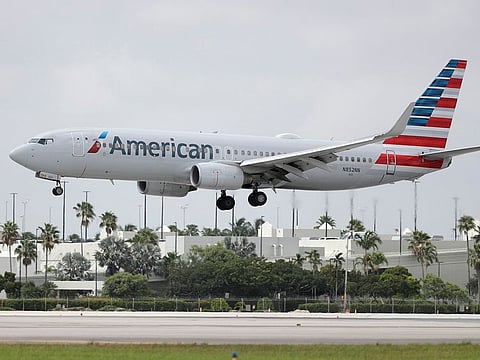
A passenger’s laptop caught fire aboard an American Airlines flight from Atlanta to Dallas last week, filling part of the cabin with smoke and leaving a passenger with burn injuries — a reminder that the lithium-ion batteries inside everyday electronic devices can become a serious hazard in the air.
American Airlines Flight 2398 was carrying 133 people when the fire broke out as the aircraft approached Dallas Fort Worth International Airport.
“Cabin fire in the back of the airplane,” the pilot told air traffic controllers as flight attendants battled the blaze, according to audio cited by CBS News.
The crew contained the laptop in a thermal containment bag and the aircraft landed safely. The US Federal Aviation Administration (FAA) is investigating.
Laptops have caught fire before
While power-bank fires have attracted increasing attention, this is not the first time a laptop has caused an emergency aboard a passenger aircraft.
In July 2024, passengers were evacuated from another American Airlines aircraft at San Francisco International Airport after a laptop battery caught fire as the plane was preparing to depart for Miami. Three people suffered minor injuries.
The incidents highlight an easily overlooked fact: Laptops, smartphones, tablets and power banks commonly use lithium-ion batteries, meaning they can be vulnerable to the same basic type of battery failure.
UAE airlines: Power bank and laptop rules
EMIRATES
Power banks
One per passenger, maximum 100Wh (watt-hours).
Cabin baggage only; not allowed in checked baggage.
Cannot be used to charge devices or be recharged during the flight.
Cannot be stored in the overhead locker; keep it in the seat pocket or a bag under the seat.
Capacity rating must be clearly visible.
Laptops
Laptops and other portable electronic devices containing lithium batteries are permitted, subject to battery limits.
Batteries above 100Wh and up to 160Wh require airline approval.
ETIHAD
Power banks
One per passenger, maximum 100Wh.
Power banks over 100Wh are not permitted.
Must be carried in cabin baggage, not checked baggage.
Using a power bank to charge a device, or recharging the power bank from the aircraft power supply, is prohibited onboard.
Laptops
Passengers can carry laptops and other personal electronic devices.
Devices may be carried in cabin or checked baggage, but those checked in must be completely switched off — not in sleep or hibernation mode — and protected from damage.
FLYDUBAI
Power banks
One per passenger, maximum 100Wh.
Cabin baggage only; not permitted in checked baggage.
Must remain switched off and cannot be used or recharged onboard.
Cannot be stored in overhead lockers; keep it under the seat or in the seat pocket.
The Wh rating must be clearly marked on the power bank.
Laptops
Laptops and other lithium battery-powered electronic devices are permitted subject to flydubai’s battery restrictions.
Devices and batteries must be protected against damage, short circuits and accidental activation.
AIR ARABIA
Power banks
Up to two power banks per passenger, each with a maximum capacity of 100Wh.
Cabin baggage only.
Must remain switched off throughout the flight.
Cannot be used to charge another device or be recharged onboard.
Cannot be kept in overhead lockers; they must be in the seat pocket or a bag under the seat.
Laptops
Laptops, phones, tablets and cameras containing lithium batteries are permitted.
Lithium-ion batteries must not exceed 100Wh under the standard allowance.
Air Arabia permits up to 15 personal electronic devices per passenger for personal use.
AT A GLANCE
Emirates: 1 power bank | 100Wh max
Etihad: 1 power bank | 100Wh max
flydubai: 1 power bank | 100Wh max
Air Arabia: 2 power banks | 100Wh each
Common rule: Keep power banks in the cabin, never in checked baggage, and don’t use or recharge them onboard.
Why can a laptop suddenly catch fire?
The danger comes from a process called thermal runaway.
Lithium-ion batteries store large amounts of energy in a compact space. If something goes wrong inside a battery, it can begin producing heat faster than it can dissipate it.
That rising temperature can trigger further chemical reactions, producing still more heat. The process can accelerate rapidly, causing the battery to swell, smoke, ignite or rupture.
The FAA says thermal runaway can occur without warning if a battery is damaged, overheated, exposed to water, overcharged or improperly packed. Manufacturing defects can also cause it.
What are the warning signs?
Passengers should immediately alert cabin crew if a laptop, phone, tablet or other lithium-powered device begins overheating, expanding, smoking or burning, the FAA says.
A swollen laptop battery or device that suddenly becomes abnormally hot should therefore never be ignored.
Flight crews are trained to recognise and respond to lithium-battery fires in aircraft cabins.
Why are power banks banned from checked baggage?
Power banks and other spare lithium batteries must be carried in cabin baggage under FAA rules.
If a cabin bag is taken at the gate and placed in the aircraft hold, passengers must remove their power banks and spare batteries and keep them in the cabin.
The reason is crucial: an overheating battery in the cabin can be spotted and dealt with quickly. A battery fire developing unseen inside baggage is far more difficult to detect and tackle.
Battery terminals must also be protected against short circuits. The FAA recommends keeping spare batteries in their original packaging, covering terminals with tape or placing them in a protective case or pouch.
Can laptops go in checked baggage?
Portable electronic devices containing lithium batteries can generally be carried in checked baggage under FAA rules, but the agency recommends keeping them in the cabin.
If checked, the device must be completely switched off and protected from accidental activation and damage.
How large can the battery be?
Most ordinary phones, tablets and laptops fall within aviation limits.
Rechargeable lithium-ion batteries are generally limited to 100 watt-hours (Wh). Batteries between 101Wh and 160Wh require airline approval, with restrictions on the number of spare batteries permitted.
Airlines may impose stricter limits, so passengers should check their carrier’s rules before travelling.
What about a damaged or swollen laptop?
Don’t take it aboard.
The FAA says damaged or recalled batteries and devices capable of producing sparks or dangerous heat must not be carried on an aircraft unless the battery has been removed or otherwise made safe.
A swollen battery, bulging laptop case, unusual heat or visible battery damage should therefore be treated as a warning before reaching the airport.
What if your laptop starts smoking in flight?
Tell the cabin crew immediately.
Don’t wait to see whether the device cools down or attempt to deal with a developing battery fire yourself.
The latest American Airlines incident shows how quickly an everyday electronic device can become a cabin emergency.
For travellers, the message is simple: It’s not only your power bank you need to watch. The lithium-ion battery inside your laptop, smartphone or tablet can also overheat and catch fire.


