
How to set up an ergonomic home office
A comfortable workstation rarely depends on a single expensive purchase
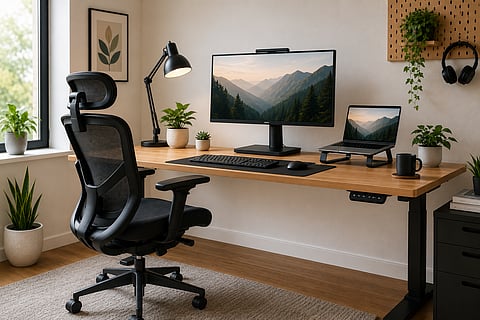
A comfortable workstation rarely depends on a single expensive purchase. Ergonomics is about how every part of your desk works together, from chair height to screen position. According to the US Occupational Safety and Health Administration, the most effective workstation keeps your body in neutral positions, with your monitor directly ahead, your shoulders relaxed and your wrists straight while typing. Those principles matter just as much in a spare bedroom or apartment study as they do in a corporate office. Once you understand the basics, a few well-chosen accessories can transform the way your workspace feels.
What it is and who it's for
An ergonomic workstation is simply one that fits the person using it. That means adjusting equipment so your body stays in a natural posture instead of adapting yourself to the desk. Your feet should rest comfortably on the floor, elbows should sit close to your sides, and the top of the monitor should be at or slightly below eye level. OSHA also recommends keeping the screen roughly 50 to 100cm from your eyes, depending on screen size and comfort. Laptop users face an extra challenge because the display and keyboard are attached. Raising the laptop improves screen height but usually works best alongside a separate keyboard and mouse. These adjustments are useful whether you work from home every day or only a few days each week.
What to look for
Prioritise adjustability over marketing language. A chair should allow you to change seat height and support your lower back rather than locking you into one position. Monitor arms and laptop stands should offer enough height adjustment to bring the display to eye level. For keyboards, focus on keeping your wrists straight and your elbows comfortably beside your body instead of searching for products that promise dramatic ergonomic benefits without evidence.
Skyland Ergonomic Office Chair
A good chair creates the foundation for every other adjustment. The Skyland model is designed to provide adjustable seating so you can align your elbows with the desk while keeping your feet supported. It has high-back mesh with lumbar support and 5D armrests. An adjustable chair is particularly valuable if more than one person uses the same workspace because the seating position can be tailored instead of remaining fixed.
MOUNTUP Single Monitor Arm
One of the quickest ways to improve a desk setup is by lifting the monitor off the desktop. A monitor arm frees space while making it easier to position the screen directly in front of you at eye level. That supports the viewing angles recommended by OSHA and makes fine adjustments simple as your seating position changes. The monitor arm supports monitors 4.4-17.6 lbs.
Lamicall Laptop Stand
Working directly on a laptop usually forces a compromise between comfortable viewing and comfortable typing. A laptop stand raises the display closer to eye height, making it easier to maintain an upright head position. The Lamicall stand uses an aluminium design with adjustable viewing angles and is intended for a wide range of notebook sizes. For longer work sessions, pair it with an external keyboard and mouse so your hands remain at desk height
Logitech MK295 Slim Wireless Keyboard and Mouse Combo
Once the screen sits at the correct height, the keyboard should allow your forearms to stay roughly parallel with the floor while your wrists remain straight. Logitech's MK295 combines a compact wireless keyboard with a quiet mouse, helping reduce desk clutter while leaving enough space to keep the mouse close to your body. Logitech rates the keyboard battery for up to 36 months and the mouse for up to 18 months under typical use.
Verdict
A better workstation is usually built through careful adjustment rather than a complete office makeover. Start with the chair because it determines your sitting position, then raise the screen until the top sits around eye level. Laptop users benefit most from adding a stand together with a separate keyboard and mouse, while desktop users often gain the biggest improvement from a monitor arm. Among these products, the MOUNTUP Single Monitor Arm delivers the greatest change for most existing workstations because monitor placement influences posture throughout the day.
Gulf News earns a commission on purchases made through links in this article, at no extra cost to you. Our editorial team selects products independently.


