Free-range media in the UAE
The Western Digital TV Live Hub lets you access music, photos and video from your UAE home
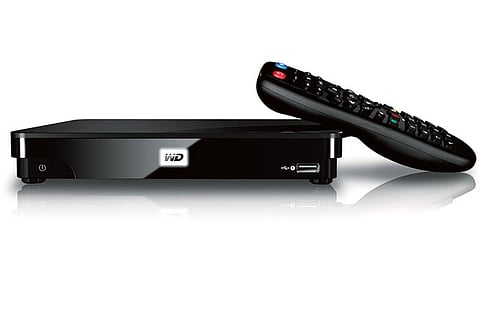
The only challenge presented by setting up the Western Digital TV Live Hub came when I realised (and not for the first time) that my home entertainment centre had been assembled incorrectly. After a bit of tangential wrangling I had the TV Live Hub powered up and connected to both my television and wireless router. If it weren't for my cheap furniture, it would have been a simple and painless affair, although you will need to supply your own HDMI, composite video or standard video cable, depending on your requirements.
With the TV Live Hub connected it was a snap to attach one of my external USB hard drives and start viewing content immediately. The device handled every type of file that I threw at it, with the exception of DRM-protected TV episodes purchased from the iTunes store. Since iTunes TV sales aren't officially available here (mine are from when I lived in the US) this is a non-issue and has moreto do with Apple than Western Digital anyway.
With the hard drive connected to the TV Live Hub, I could view all my files but had to rearrange slightly to start copying content onto the Live Hub's generous 1TB internal drive. To do this, I simply fired up my MacBook (my Windows 7 netbook would have sufficed as well), where the Live Hub appeared as a shared network drive called, unsurprisingly, TV Live Hub. With the external drive connected to the MacBook, I was able to drag and drop files onto the Live Hub. This means that pictures, videos, and music files stored on the Live Hub are now accessible all over the house from any WiFi-enabled device, or at least as faras my WiFi signal reaches; the kitchen gets a bit sketchy to be completely honest.
The TV Live Hub also comes ready to connect to a number of streaming content services, however at present the most exciting prospects, streaming movies via Netflix or Blockbuster, aren't available in the UAE market. Netflix just entered the Canadian market, so perhaps they'll make it to the UAE sometime this decade. Then again, maybe another player will step in - OSN perhaps?
One popular service that does work now on TV Live Hub is Youtube; I was able to pull up one of my favourite viral videos using the search function and, after a brief wait, the video streamed perfectly. On the downside, using the search function is just a tad clunky since you don't have a proper keyboard for text entry.
While premium streaming video isn't currently possible with the WD Live Hub in this market, it really does make an excellent addition to the home entertainment centre. Its internal drive is greatfor storing or backing up data, and the list of supported file types is very impressive. The GUI is a bit harder to navigate on non-HD TV sets as the text is obscured by the low resolution, and some users might decry the lack of built-in WiFi; but in my case running a network cable from Live Hub to my router was simple and unobtrusive. WD has a list if compatible USB WiFi adapters on their website as an alternative.
If you have a wealth of digital media, and could use a central access point with connectivity to your TV, the WD Live Hub is a compelling solution that has seen a lot of use at my place. Which reminds me; I borrowed the video cable from my DVD player to set up the Live Hub and never replaced it... I haven't wanted it since.
Review: MSI Wind Top is pretty impressive!
At first impression, the MSI Wind Top AE2420 3-D has almost everything. The PC is said to be the first big screen all-in-one to offer 3-D technology and includes shutter glasses that shoot out 3-D images.
The Wind Top comes with a 2.53GHz Core i7-S860 processor, 4GB of RAM, 1TB of hard-drive space and a 23.6- inch multitouch display. It also features a Blu-Ray disc player and a 1.3-megapixel webcam.
The speakers sit on the face of the machine below the touchscreen where there are a number of touch-sensitive buttons to adjust the volume, meddle with the screen brightness and shut down the screen or the computer.
There’s a slot for the Blu-Ray drive, two USB 3.0 ports and a multiformat card reader and WiFi for all your surfing needs.
The best part is that you can play 3-D enabled games and videos with shutter glasses that shut off automatically when you’re not within the sensor range (to conserve battery life).
For an attractive all-in-one PC, the MSI Wind Top is a steal!
- By Krita Coelho, e+

