A guide for the technologically challenged
Not sure what is all the fuss about smart televisions? We break down set-top boxes, TV apps and qwerty remote control for you so that you can have a whale of a time with these interactive gizmos
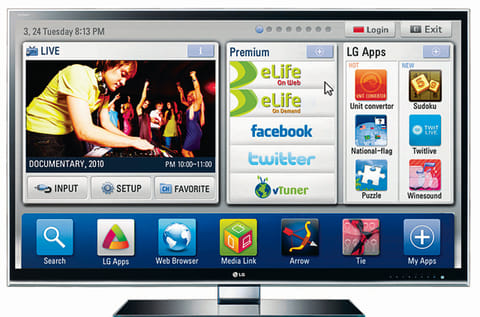
When the Joneses picked up their plasma, we did too; when they moved their plasma to their spare room and picked up an LCD, we did too, along with the LED that followed. However, we stopped when they picked up a smart television because not many of us understood it.
Being the technology hounds we are, we eventually sold out and bought one and there it is, shiny and new, mounted on our walls — where televisions these days should be. Our 50-inch LCD has been banished to the bedroom, the place where old technology goes to die.
How does life pan out after the LED, 3D, Wi-Fi-equipped smart television? Each distributor has their own applications that are available through their own brand of smart televisions.
For those who are oblivious to what's going on in the world of tech, we help you save yourself the embarrassment while chinwagging with your tech-obsessed friends with a few FAQs that might come in handy.
How is this different from the television I have right now?
It isn't. One of the main plus points with the internet-enabled smart television is being able to consolidate all the media under your roof in one place through your Wi-Fi connection. You can also plug in the LG Smart TV Upgrader box that allows you to upgrade your existing LCD or LED through a HDMI cable into a smart television. Philips SimplyShare brings the media from all your portable devices under one innovative umbrella. So say goodbye to multiple music playlists and hard-to-manage images.
Why would I integrate my TV with my laptop when an HDMI cable does the trick anyway?
True. In its simplest form, the smart television eliminates the need of an HDMI cable while saving you from the tedious task of pressing two buttons. It does eliminate the constant back and forth between your internet browser, iTunes and your television shows. Having said that, the television trumps any other media device out there when it comes to technology. LG's Media Link draws all your media and adapts your existing devices into a stylish library. The link also provides additional information on your movies and music by automatically searching through the internet. The movie's plot, summary, cast, director and viewer ratings are updated instantly.
What about new content, how does this work?
Exactly the same way it works on your smartphone, only on a massive screen. For example, LG's Cinema 3D Smart TV has more than 100 applications available to download and the list keeps growing by the week. The LG Apps Store offers applications to suit every age group. Customers have access to games, music and entertainment apps and the usual social media offerings.
Those apps are readily available on our phones anyway, anything unique to smart televisions?
Yes. Panasonic went further with their social television app. What this does is include your Facebook and Twitter stream within the screen while you watch your favourite shows, movies or sports. This means that your annoying friends who get ignored while they try to Facebook-chat with you on your laptop can now get ignored while they try to Facebook-chat with you on your television. On the flip side, watching those late football games away from your mates won't be as lonely as before with a chat window embedded into the screen.
I heard about a qwerty remote control, I trust this has something to do with smart televisions?
It does. Users got tired of the on-screen keyboard that required a point-and-click form of text input. The next step would have been touch screen or qwerty. Thankfully they opted for qwerty — cleaning fingerprint marks of your smart television might have been wearisome. In technology's quest to make our lives easier and promote laziness within otherwise healthy folks, the majority of smart televisions now have downloadable applications that can sync with your smartphone. Customers have the opportunity to download related applications on their handheld devices that allows them to use their phone as a remote control. Panasonic's Viera Remote App can be linked to the iPhone, iPod touch and iPad through your home's Wi-Fi connections.
With the entire worldwide web available on the family television, what safety and security measures are in place when it comes to content?
Smart televisions come with their own advanced parental control options. The Samsung Smart TVs are equipped with six user profiles along with web filters that allow the user to block sites. Primarily being a viewing device, you cannot save media onto the Samsung smart television. However, they do have a small amount of internal memory to store applications.


